


On this page
With React Native 0.76, released in late 2024, the New Architecture became the default for all new projects. In early 2026, the React team released React Native 0.82, and the old architecture was permanently disabled. The framework has more than 1.6 million weekly downloads on npm, and 9.14% of highly skilled developers worldwide work with it, according to the Stack Overflow Developer Survey. But the basic architecture has changed fundamentally, and most hiring processes haven't caught up.
In 2026, the New Architecture redefines what it means to be a "senior," what to look for in interviews, and what salary range to expect if you're hiring a React Native developer. Glassdoor still runs the old architecture to host its job descriptions, interview questions, and salary benchmarks. That gap costs teams months of search time and hires that look good on paper but can't do the actual work.
In this guide, we'll explain what changed, why it matters for your project, and exactly how it should change your hiring process.
What Actually Changed
React Native apps have always had two sides: JavaScript (where your app's logic and UI code live) and native code (where iOS and Android actually render things on screen). The question has always been how those two sides communicate.
The old way: the bridge
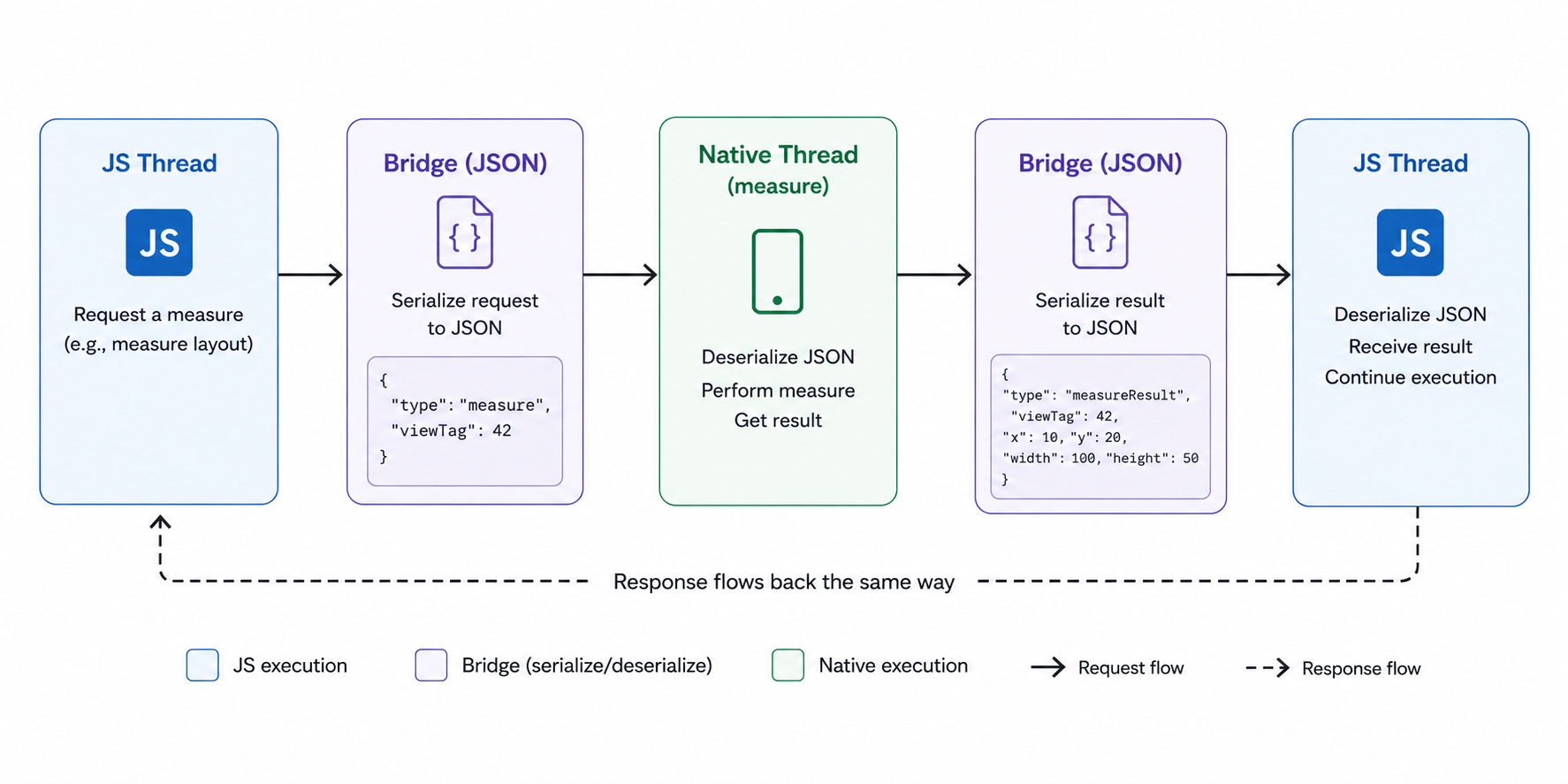
Before 0.76, JavaScript and native code communicated over an async bridge. All of the messages they exchanged were serialized to JSON, sent over the bridge, deserialized on the other side, and processed. It worked, but slowly. Traffic between JS and native (e.g., animation while processing data) would become heavy, blocking the bridge and causing frame drops, stuttering, and lag.
Think of it as two people communicating by writing letters. It works, but there's a delay on every message, and if you try to have a real-time conversation, the mailbox gets overwhelmed.
The new way: JSI, Turbo Modules, and Fabric
The New Architecture replaces that letter-writing system with a direct phone line.
JSI (JavaScript Interface) lets JavaScript call native code synchronously and directly, without serializing to JSON. Zero-copy, no bridge overhead, no waiting. This is the foundational change that makes everything else possible.
Turbo Modules are an improvement on the old Native Modules system. They are lazy-loaded (only initialized when your app actually uses them, so your app starts faster), typed by Codegen specs (so type mismatches are caught at build time rather than at runtime), and built directly on JSI (so they run faster).
Fabric is the new rendering engine. It replaces the old renderer, in which the shadow tree (the layout calculation layer) ran in Java on Android and in Objective-C on iOS. In Fabric, the shadow tree is implemented in C++ and shared across both platforms. This enables concurrent rendering (preparing multiple UI states simultaneously) and synchronous layout measurement (no more async round-trips to calculate where a component should be on screen).
What this means in practice
| Metric | Old Architecture | New Architecture | Source |
|---|---|---|---|
| Cold startup time | Baseline | 43% faster | Shopify production data |
| Rendering performance | Baseline | 39% improvement | Shopify production data |
| Memory usage | Baseline | 25% reduction | Shopify production data |
| Native module call overhead | 10x overhead from JSON serialization | Near-zero overhead via JSI | React Native docs |
| Module loading | Eager (all modules loaded at startup) | Lazy (loaded on first use) | React Native docs |
These aren't theoretical benchmarks. Shopify, which runs one of the largest React Native codebases in production, reported these numbers after migrating its core mobile app. Independent benchmarks from building apps show React Native with the New Architecture achieving cold start times around 350ms, with memory deltas of 45.13 MB on iOS and 32.98 MB on Android, both significant improvements over the old bridge architecture.
The 2026 ecosystem beyond JSI, Fabric, and Turbo Modules
The New Architecture is the foundation. But developers work every day with the ecosystem built on top of the foundation. Knowing these layers allows you to evaluate candidates and scope out projects:
Hermes v1 is now the default JavaScript engine on both iOS and Android. It provides ahead-of-time bytecode compilation, faster startup, lower memory usage, and improved garbage collection. Hermes is not optional with the New Architecture - JSI depends on it.
Nitro Modules are a new layer on top of Turbo Modules. More libraries are rewriting on Nitro to further reduce JS-to-native overhead on performance-critical paths. As on-device AI models and GPU-heavy features become more integrated into React Native apps, the need for robust multi-threading is shifting from a niche optimization to a baseline need.
Expo SDK 52+ ships with the New Architecture enabled by default for all managed workflow apps. Most teams can adopt the New Architecture without ejecting or writing native code. EAS Build handles cloud-based builds, EAS Update enables over-the-air JavaScript updates without App Store review, and Expo Router provides file-based navigation that has become the industry standard for new projects. Setting up a new project takes one command (npx create-expo-app my-app), and your developer can test on a physical phone by scanning a QR code with the Expo Go app. Every file save triggers a hot reload in about one second. This developer experience matters for hiring because it determines how fast your team iterates.
It does not automatically improve performance. The new architecture opens up possibilities. But on top of that are real gains: concurrent rendering, worklets, GPU-powered solutions, and more control over threading. In your interview, ask candidates about their understanding of this difference. A developer who says "the New Architecture makes everything faster" doesn't understand it as well as one who says "the New Architecture removes the bottleneck that prevented us from building X."
What the New Architecture Does NOT Change
JavaScript is still single-threaded. JSI removes bridge overhead, but expensive JS computations still block the UI. The New Architecture reduces JS-to-native communication cost, not JavaScript execution cost.
Third-party library gaps still exist. Most popular libraries have already been updated, but a few older or less-maintained packages may cause issues. React Native includes a compatibility layer that helps many of these libraries keep working during the transition, but you should still test all major dependencies before moving a production app to the New Architecture.
Gesture handling still requires react-native-gesture-handler and Reanimated 3. The New Architecture makes these faster but doesn't eliminate the need for specialized animation knowledge.
Hermes is required and non-optional. JSI depends on Hermes. JavaScriptCore will not work.
The Android long tail is still real. The manufacturer's font scaling overrides result in inconsistencies on low-end devices, and OS-specific permission differences remain. Your developer needs to test on real mid-range Android devices, not a simulator on a MacBook.
JavaScript errors can manifest as visual bugs. Errors are easy to spot in web React because the console messages are usually clear, but in React Native, some errors can cause the UI to look wrong with no obvious trace. That's why experience in production debugging is more important than knowledge of frameworks.
The modern tool stack built on the New Architecture
When evaluating candidates or scoping projects in 2026, this is the production-standard tool stack that experienced React Native developers use:
| Layer | 2026 Standard | What It Replaced |
|---|---|---|
| Navigation | Expo Router (file-based) | React Navigation manual config |
| Server state | TanStack Query (React Query) | Manual fetch + Redux |
| Client state | Zustand | Redux boilerplate |
| Animations | Reanimated 3 (UI thread worklets) | Animated API (JS thread) |
| Lists | FlashList | FlatList (for large datasets) |
| Forms | React Hook Form | Custom form state management |
| Builds & CI/CD | EAS Build + EAS Update | Manual Xcode/Gradle builds |
| Language | TypeScript (strict mode) | Plain JavaScript |
| JS Engine | Hermes v1 | JavaScriptCore |
This table is useful during screening. A candidate who mentions TanStack Query, Zustand, Reanimated 3, and FlashList is working with the current ecosystem. A candidate whose answers center on Redux, the old Animated API, and FlatList for everything is working with patterns from 2021-2022. Both can ship apps, but the former will ship faster and produce more maintainable code.
Why the tool stack matters: two code examples
Animations: old Animated API vs Reanimated 3
The old Animated API runs animations on the JavaScript thread. When the JS thread is busy processing data or network requests, animations stutter:
// Old Animated API - runs on JS thread, blocks on heavy load
import { Animated } from 'react-native';

const fadeAnim = new Animated.Value(0);
Animated.timing(fadeAnim, {
  toValue: 1,
  duration: 500,
  useNativeDriver: true, // Only works for opacity/transform, not layout
}).start();
Reanimated 3 runs animations on the UI thread via worklets, JavaScript functions compiled to execute outside the JS thread. Animations stay at 60fps even when the JS thread is saturated:
// Reanimated 3 - runs on UI thread, never blocks
import Animated, {
  useSharedValue,
  withTiming,
  useAnimatedStyle
} from 'react-native-reanimated';

const opacity = useSharedValue(0);
opacity.value = withTiming(1, { duration: 500 });

const animatedStyle = useAnimatedStyle(() => ({
  opacity: opacity.value,
}));

The critical difference is that useSharedValue is not React state. It updates the UI thread directly without triggering component re-renders. A candidate who understands this builds animations that never drop frames. One who treats shared values like useState will produce janky interactions under load.
Lists: FlatList vs FlashList
For lists with more than a few hundred items, FlashList (built by Shopify) is a drop-in replacement for FlatList with dramatically better recycling behavior:
// FlatList - creates new views as you scroll, expensive on large datasets
import { FlatList } from 'react-native';

<FlatList
  data={items}
  renderItem={({ item }) => <ItemCard item={item} />}
  keyExtractor={(item) => item.id}
/>

// FlashList - recycles views like native UITableView/RecyclerView
import { FlashList } from '@shopify/flash-list';

<FlashList
  data={items}
  renderItem={({ item }) => <ItemCard item={item} />}
  estimatedItemSize={80}  // Required: enables recycling optimization
/>

The only API difference is estimatedItemSize, but the performance difference on a list of 1000+ items is noticeable to the naked eye, particularly on mid-range Android devices. A candidate who defaults to FlashList for large lists understands production performance constraints. One who uses FlatList for everything hasn't dealt with real-world scroll performance issues.
What React Native code actually looks like (for non-technical hiring managers)
If you're evaluating developers but don't write code yourself, it helps to understand the basics of what they produce day to day. React Native uses JavaScript (or TypeScript) to build screens using components that map to native platform elements:
| React Native Component | What It Becomes | Web Equivalent |
|---|---|---|
| <View> | UIView (iOS) / android.view.View (Android) | <div> |
| <Text> | UILabel (iOS) / TextView (Android) | <p> or <span> |
| <Image> | UIImageView (iOS) / ImageView (Android) | <img> |
| <TextInput> | UITextField (iOS) / EditText (Android) | <input> |
| <Pressable> | Native touch handler on both platforms | <button> |
| <ScrollView> | UIScrollView (iOS) / ScrollView (Android) | <div> with overflow |
| <FlatList> / <FlashList> | Recycler list (efficient for large datasets) | No direct equivalent |
This is why React Native apps feel native: they ARE native. Unlike hybrid frameworks that wrap a web browser (Ionic, Cordova), React Native renders actual platform UI components. The JavaScript code defines what to render. The native layer handles how it looks and behaves on each platform.
Styling uses JavaScript objects with CSS-like syntax. The layout uses flexbox, which works the same as web CSS flexbox with one key difference: the default flex direction is column (vertical) instead of row (horizontal). A developer coming from web React who doesn't know this will produce broken layouts on their first day.
Here's what a simple screen looks like in practice:
// A profile screen in React Native (2026 patterns)
// Uses the same hooks and component model as React web
import { View, Text, Image, StyleSheet } from 'react-native';
import { useQuery } from '@tanstack/react-query';

export default function ProfileScreen() {
  const { data: user, isLoading } = useQuery({
    queryKey: ['user'],
    queryFn: () => api.getProfile(),
  });
  if (isLoading) return <LoadingSkeleton />;
  return (
    <View style={styles.container}>
      <Image source={{ uri: user.avatarUrl }} style={styles.avatar} />
      <Text style={styles.name}>{user.name}</Text>
      <Text style={styles.role}>{user.title}</Text>
    </View>
  );
}

const styles = StyleSheet.create({
  container: { flex: 1, alignItems: 'center', justifyContent: 'center' },
  avatar: { width: 120, height: 120, borderRadius: 60 },
  name: { fontSize: 24, fontWeight: 'bold', marginTop: 16 },
  role: { fontSize: 16, color: '#666', marginTop: 8 },
});

If you've seen any React web code, this looks familiar. The hooks (useQuery), the component structure, and the JSX syntax are identical to React web. The only differences are the components (View instead of div, Text instead of p) and the styling (StyleSheet objects instead of CSS files). This is React Native's structural hiring advantage: any React web developer can read and understand this code immediately, which means your web team can contribute to mobile development with minimal ramp-up.
How This Changes Who You Hire
The architectural shift translates into a concrete hiring question: does your next developer need to work at the JSI and Fabric layers or at the JavaScript application layer above them? Getting this wrong is the most common reason React Native searches take 10+ weeks instead of 4-5.
Two different developer populations
Most developers who use the term "senior React Native" learned the framework before the New Architecture was introduced. They understand hooks, TypeScript, React Navigation, Reanimated, and state management. They can deliver polished applications. They are not native to the New Architecture layer (JSI bindings, Codegen specifications, Fabric's C++ shadow tree, and Hermes profiling). Not a chance. Until early 2026, the majority of codebases were still running 0.73 or older. There was no reason to learn Turbo Modules until the migration became someone's responsibility.
The developer pool for New Architecture work is dramatically smaller than the total React Native pool. The Stack Overflow 2024 survey shows 9.14% of professional developers use React Native. npm shows 1.6 million weekly downloads. The fraction who have shipped a production Turbo Module spec is a small subset of both numbers.
The salary gap
This supply-demand imbalance drives a measurable salary premium:
| Profile | What They Know | 2026 Salary Range (US) |
|---|---|---|
| Mid-level JS-layer developer | TypeScript, React Navigation, Zustand/Redux, Reanimated. Ships to both stores. Doesn't write native code | $100,000-$128,000 |
| Senior New Architecture developer | JSI, Turbo Modules, Fabric, bare workflow, custom Swift/Kotlin modules, Hermes profiling | $145,000-$185,000 |
| Staff / Architect | Full New Architecture migration ownership, CI/CD design, multi-platform surface area | $185,000-$215,000 |
Salary data from ZipRecruiter ($129,348 national avg), Glassdoor ($112,865 national avg), and recruiter placement data. The Bay Area adds $15,000-$25,000 across all levels.
The 20-30% premium for New Architecture fluency is driven by scarcity, not complexity. The Bureau of Labor Statistics predicts 17% employment growth of software developers through 2034, but the supply of specialized mobile native-layer developers is not keeping pace. Senior engineers with verified turbo module production experience were fielding 3-5 simultaneous offers in early 2026.
By way of context for the larger cross-platform market, the 2024 Stack Overflow Developer Survey finds Flutter and React Native neck and neck among professional developers (9.4% vs 9.14%). The hiring advantage of React Native is its integration with the JavaScript ecosystem. Your web team already knows TypeScript, your backend probably runs on Node.js, and tools such as ESLint, Prettier, and Jest transfer over directly. Your team must learn Dart, a language used almost exclusively for Flutter, which is the price of admission. If your team already has React web experience, the React Native talent pool is much bigger and faster to hire from. Check out our React Native vs Flutter comparison for a full breakdown.
When you need New Architecture experience (and when you don't)
Not every project requires a New Architecture specialist. Here's how to decide:
| Your Situation | Who to Hire |
|---|---|
| New project starting on 0.76+ (the default) | New Architecture experience preferred. The developer will be working with JSI and Fabric, whether they know them or not |
| Existing app on 0.73 or older, no migration planned | Old-architecture experience is fine. The developer's existing skills match your codebase |
| Migration from old architecture to new is on your roadmap | New Architecture specialist required. This is a $145K-$185K hire. Don't try to do it cheaper |
| Expo managed workflow, no custom native modules | Mid-level JS layer developer is sufficient. Expo abstracts the native layer |
| Custom hardware integrations (camera, Bluetooth, NFC, biometrics) | New architecture + native module skills (Swift/Kotlin). This is the rarest and most expensive profile |
Put your workflow and architecture version in the job description. A developer who fits the first row is wrong for the fifth row, even though both would apply to a generic "React Native developer" posting.
How to Test for New Architecture Knowledge in Interviews
Knowing which profile you need is the first step. Testing whether a candidate actually has the depth they claim is the second step. Most React Native interview questions don't test knowledge of the New Architecture at all. They test hooks, navigation, state management, and basic performance optimization, all of which are important but insufficient for 2026 production work. The questions below specifically target the architectural layer that separates the two developer populations described above.
Add these questions to your technical interview:
"Walk me through the difference between a Native Module and a Turbo Module, and where JSI fits."
About a third of senior candidates can't answer at all. Another third gives a textbook answer that collapses under one follow-up question ("Have you actually written a Turbo Module spec from a Codegen file?"). The final third can walk through the binding, the Codegen spec, and the lazy-loading behavior and explain why it matters. Those are the engineers who can own a migration.
Here's what the real code difference looks like, so you can see whether a candidate's explanation matches reality:
Old Native Module (pre-0.76):
// Registered globally, loaded eagerly at startup
import { NativeModules } from 'react-native';
const { MyModule } = NativeModules;

// Async call through the JSON bridge
const result = await MyModule.getData();
New Turbo Module (0.76+):
// Codegen spec file (typed, generates native bindings automatically)
import type { TurboModule } from 'react-native';
import { TurboModuleRegistry } from 'react-native';

export interface Spec extends TurboModule {
  getData(): Promise<string>;
}

// Lazy-loaded via JSI (only initialized when first called)
export default TurboModuleRegistry.getEnforcing<Spec>('MyModule');
The key differences a strong candidate explains: the Codegen spec generates type-safe native bindings at build time (catching errors at runtime), the module is lazy-loaded (improving startup), and JSI eliminates JSON serialization (direct C++ binding). A candidate who can explain these three things in their own words has real experience. One who can't have read the docs but hasn't shipped with it.
"What does Fabric change about how layout works compared to the old renderer?"
A good answer points out that the shadow tree was moved from Java/Objective-C to C++, which allows synchronous layout measurement and concurrent rendering. A weak answer would be "Fabric is faster" without explaining the underlying mechanism.
And that's why the mechanism matters in practice. In the old renderer, measuring a component's layout was an async round-trip:
In Fabric, layout measurement is synchronous through the C++ shadow tree:
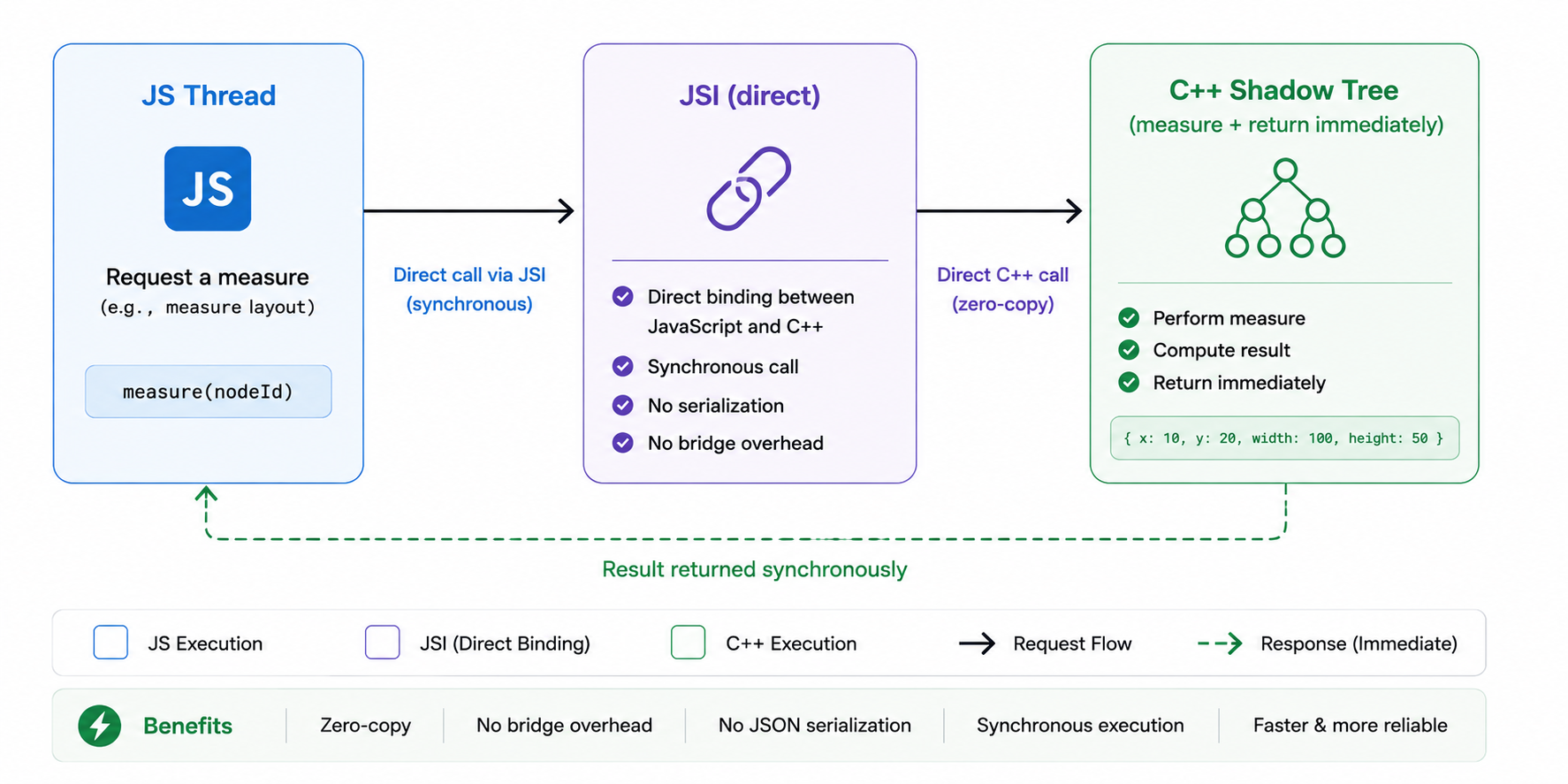
This is what makes features like synchronous scroll position reads, instant layout measurements for animations, and concurrent rendering possible. A developer who understands this pipeline can debug layout issues that only appear in the new renderer.
"Walk me through how you'd profile and optimize a React Native app running on Hermes."
Hermes is required for the New Architecture. A strong candidate knows how to use Hermes's CPU profiler to identify hot paths and understands the difference between bytecode precompilation and runtime interpretation.
# Capture a CPU profile from a physical device
adb shell am broadcast -a com.facebook.hermesprofile.START
# ... use the app, reproduce the slow interaction ...
adb shell am broadcast -a com.facebook.hermesprofile.STOP

# Pull the profile and convert to Chrome DevTools format
adb pull /data/local/tmp/sampling-profiler-trace.cpuprofile
npx hermes-profile-transformer sampling-profiler-trace.cpuprofile
A candidate who can describe this workflow has actually profiled production apps. A candidate who says "Hermes is just faster" without being able to verify that claim hasn't done the work.
For a complete list of interview questions by seniority level, see our React Native interview questions guide.
The Migration Timeline: What to Plan For
If your existing app runs on 0.73 or older, migration is no longer optional. React Native 0.82 permanently disabled the old architecture, and support for the old bridge in community libraries is disappearing. The question is when, how long, and what kind of developer you need.
What migration code looks like in practice
The most common migration task is converting old Native Modules to Turbo Modules. Here's a real before/after for a simple native module that returns device battery level:
Before (old Native Module in Swift):
// iOS: MyBatteryModule.m
@objc(MyBatteryModule)
class MyBatteryModule: NSObject {
  @objc func getBatteryLevel(
    _ resolve: RCTPromiseResolveBlock,
    reject: RCTPromiseRejectBlock
  ) {
    UIDevice.current.isBatteryMonitoringEnabled = true
    resolve(UIDevice.current.batteryLevel)
  }
}
// Registered via RCT_EXTERN_MODULE, loaded eagerly at startup
After (Turbo Module with Codegen spec):
// Step 1: Write the Codegen spec in TypeScript
// NativeMyBattery.ts
import type { TurboModule } from 'react-native';
import { TurboModuleRegistry } from 'react-native';

export interface Spec extends TurboModule {
  getBatteryLevel(): Promise<number>;
}
export default TurboModuleRegistry.getEnforcing<Spec>('MyBattery');
// Step 2: Implement in Swift, conforming to the generated spec
// MyBatteryModule.swift
@objc(MyBattery)
class MyBattery: NSObject, NativeMyBatterySpec {
  func getBatteryLevel() async throws -> Double {
    UIDevice.current.isBatteryMonitoringEnabled = true
    return Double(UIDevice.current.batteryLevel)
  }
}
The Codegen step is what most developers find unfamiliar. The TypeScript spec file generates native interface bindings automatically at build time, ensuring type safety between JavaScript and native code. A developer who has done this before knows the workflow. A developer who hasn't will need 2-4 weeks just to understand the Codegen pipeline before being productive on actual migration work.
Migration timeline by complexity
Here's what to expect based on your codebase:
| Migration Complexity | Timeline | What's Involved |
|---|---|---|
| Simple (Expo managed, few native deps) | 2-4 weeks | Update Expo SDK, test dependency compatibility, resolve breaking changes |
| Moderate (bare workflow, some native modules) | 4-8 weeks | Rewrite native modules as Turbo Modules, update Fabric renderer, test across devices |
| Complex (heavy native layer, custom bridges, legacy dependencies) | 8-16 weeks | Full native module rewrite, Codegen spec creation, Hermes migration, CI/CD updates, comprehensive regression testing |
The key variable is how many custom native modules your app has and how deeply they rely on the old bridge's async behavior. Apps with 2-3 native modules migrate in weeks. Apps with 10+ custom bridges that assume asynchronous communication may need fundamental architectural changes.
The React Native version timeline (why urgency matters)
| Version | Release | Architecture Impact |
|---|---|---|
| RN 0.68 (2022) | New Architecture introduced as opt-in experimental | Migration possible but not required |
| RN 0.73 (2023) | New Architecture stable but opt-in | Most production apps still on old bridge |
| RN 0.76 (Late 2024) | New Architecture becomes default for new projects | New projects inherit JSI, Fabric, Turbo Modules automatically |
| RN 0.82 (Early 2026) | Old architecture permanently disabled | Bridge compatibility layer is a migration tool, not a permanent solution |
| Expo SDK 52 (2026) | New Architecture default for managed workflow | Expo managed apps get New Architecture without native code |
| RN 0.84 (Expected 2026) | Fabric becomes sole renderer, Hermes 1.0 stable | No fallback to old rendering pipeline |
What to Do Next
If you're starting a new project, the New Architecture is already the default. If you're migrating, the window to delay is closing. React Native 0.82 disabled the old architecture, and library support for the old bridge is disappearing.
For a deeper dive into must-have skills depending on which side of this migration you're on, see our skills guide. For the full hiring process, see our step-by-step hiring guide.
At Hire React Native Developers, every developer on our platform has passed a 5-stage vetting process, including live coding on JSI, Turbo Modules, and Fabric. Vetted senior developer in your team within 5 days, 2-week risk-free trial. Hire a React Native Developer →
Ready to build? dedicated React Native developers through our vetted network.


